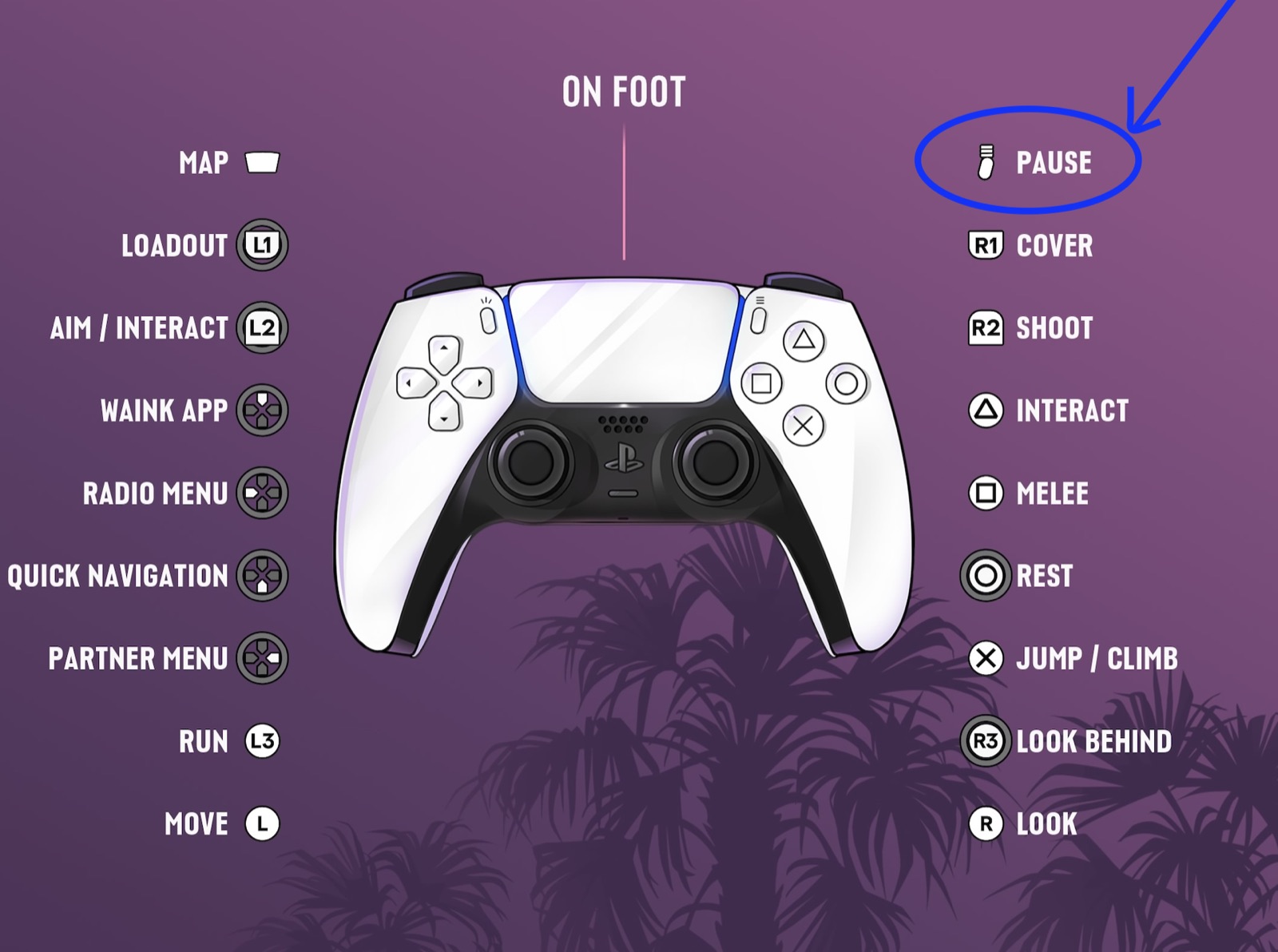
In GTA 6 you crouch with Circle (B on Xbox), take cover with R1 (RB) and jump or climb with X (A). Press the Options button (Menu on Xbox), the small button with three lines at the top right of the controller, to pause and open the game menu.
Below are both control screens from the game, on foot and in vehicles, with every button they list. We play on PS5, so the screens show the DualSense. On Xbox, use the button in the same position: Circle is B, Cross is A, Square is X, Triangle is Y, L1 and R1 are LB and RB, L2 and R2 are LT and RT, and the touchpad is the View button.
On-foot controls
The game marks some buttons with a ring. Those are held, not tapped, which is how one button can do two jobs: tap Circle to crouch, hold it to rest.
| Action | PS5 | Xbox |
|---|---|---|
| Move | Left stick | Left stick |
| Look | Right stick | Right stick |
| Run | L3 (click the left stick) | Click the left stick |
| Jump / climb | X | A |
| Crouch | Circle | B |
| Rest | Hold Circle | Hold B |
| Cover | R1 | RB |
| Aim / interact | Hold L2 | Hold LT |
| Shoot | R2 | RT |
| Melee | Square | X |
| Interact | Triangle | Y |
| Weapon loadout | Hold L1 | Hold LB |
| Look behind | Hold R3 | Hold the right stick in |
| Phone | D-pad up | D-pad up |
| WAiNK app | Hold D-pad up | Hold D-pad up |
| Radio menu | Hold D-pad left | Hold D-pad left |
| Quick navigation | Hold D-pad down | Hold D-pad down |
| Partner menu | Hold D-pad right | Hold D-pad right |
| Map | Touchpad | View button |
| Pause / menu | Options | Menu |
| Photo Studio (photo mode) | Square in the pause menu | X in the pause menu |
Driving and boat controls
Cars, bikes and boats share one layout. The two that catch people out: you shoot from a vehicle with R1, not R2, and the horn is on L3.
| Action | PS5 | Xbox |
|---|---|---|
| Accelerate | R2 | RT |
| Brake / reverse | L2 | LT |
| Steer | Left stick | Left stick |
| Handbrake | X | A |
| Horn / nitrous | L3 | Click the left stick |
| Headlights | Circle | B |
| Shoot | R1 | RB |
| Holster weapon | L1 | LB |
| Melee | Square | X |
| Exit vehicle | Triangle | Y |
| Indicate left / right | D-pad left / right | D-pad left / right |
| Objective / minimap | D-pad down | D-pad down |
| Phone | D-pad up | D-pad up |
| Look behind | Hold R3 | Hold the right stick in |
| Map | Touchpad | View button |
How to pause, open the menu and close it
Press the Options button on PS5, the small button with three lines to the right of the touchpad. On Xbox it is the Menu button in the same place. The game pauses and a menu opens with six entries:
| Entry | What it is for |
|---|---|
| Map | The full map |
| Game | Your saves |
| Store | The in-game store |
| Help | The game's help pages |
| Photo Studio | The photo mode. Square (X on Xbox) also opens it from this screen |
| Settings | The game's options |
To close the pause menu and get back to the game, press Circle (B on Xbox), shown as Back at the bottom right of the screen, or press Options (Menu) again. Your saves are under Game, so that is the place to save before you stop playing.
How to save in GTA 6, and when you can't
How to open Photo Studio (photo mode)
GTA 6's photo mode is called Photo Studio. Pause the game with Options (Menu on Xbox), then either select Photo Studio in the list or press Square (X on Xbox) to go straight in.
How to crouch
Tap Circle on PS5 or B on Xbox to crouch, and tap it again to stand up. Hold the same button instead and your character rests.
How to take cover
Walk up to a wall, car or crate and press R1 on PS5 or RB on Xbox to take cover behind it. On foot, R1 is only cover; shooting stays on R2.
How to heal in GTA 6, including in cover
How to holster your gun
In a car, bike or boat, press L1 on PS5 or LB on Xbox to put your weapon away. On foot, hold L1 (LB) to open your weapon loadout and pick what you carry.
How to honk the horn and turn on the headlights
Click the left stick (L3) to sound the horn. The game lists the same button as nitrous, for vehicles that have it. Headlights are on Circle (B on Xbox), and the D-pad left and right work the turn signals.
Is there a first-person mode?
No. GTA 6 plays in third person, on foot and in vehicles, and there is no first-person camera option at launch.
The GTA 6 settings worth changing first
How to call a taxi and fast travel with the phone
Quick answers
How do you crouch in GTA 6?
Tap Circle on PS5 or B on Xbox. Holding the same button makes your character rest instead.
How do you take cover in GTA 6?
Move next to a wall or object and press R1 on PS5 or RB on Xbox.
How do you holster your gun in GTA 6?
In a vehicle, press L1 on PS5 or LB on Xbox. On foot, hold L1 (LB) to open the weapon loadout.
How do you honk the horn in GTA 6?
Click the left stick (L3 on PS5). The same button fires nitrous on vehicles that have it.
How do you shoot while driving in GTA 6?
Press R1 on PS5 or RB on Xbox. R2 and RT accelerate when you are in a vehicle.
Is there first person in GTA 6?
No. GTA 6 has no first-person camera mode. It plays in third person on foot and in vehicles.
How do you close the pause menu in GTA 6?
Press Circle on PS5 (B on Xbox), the Back prompt at the bottom right, or press the Options button (Menu on Xbox) again.
Is there a photo mode in GTA 6?
Yes, it is called Photo Studio. Pause the game, then pick Photo Studio from the menu or press Square on PS5 (X on Xbox).
How do you pause GTA 6?
Press the Options button on PS5 or the Menu button on Xbox, the small button with three lines on the right of the controller.